¶ On Screen Tracker
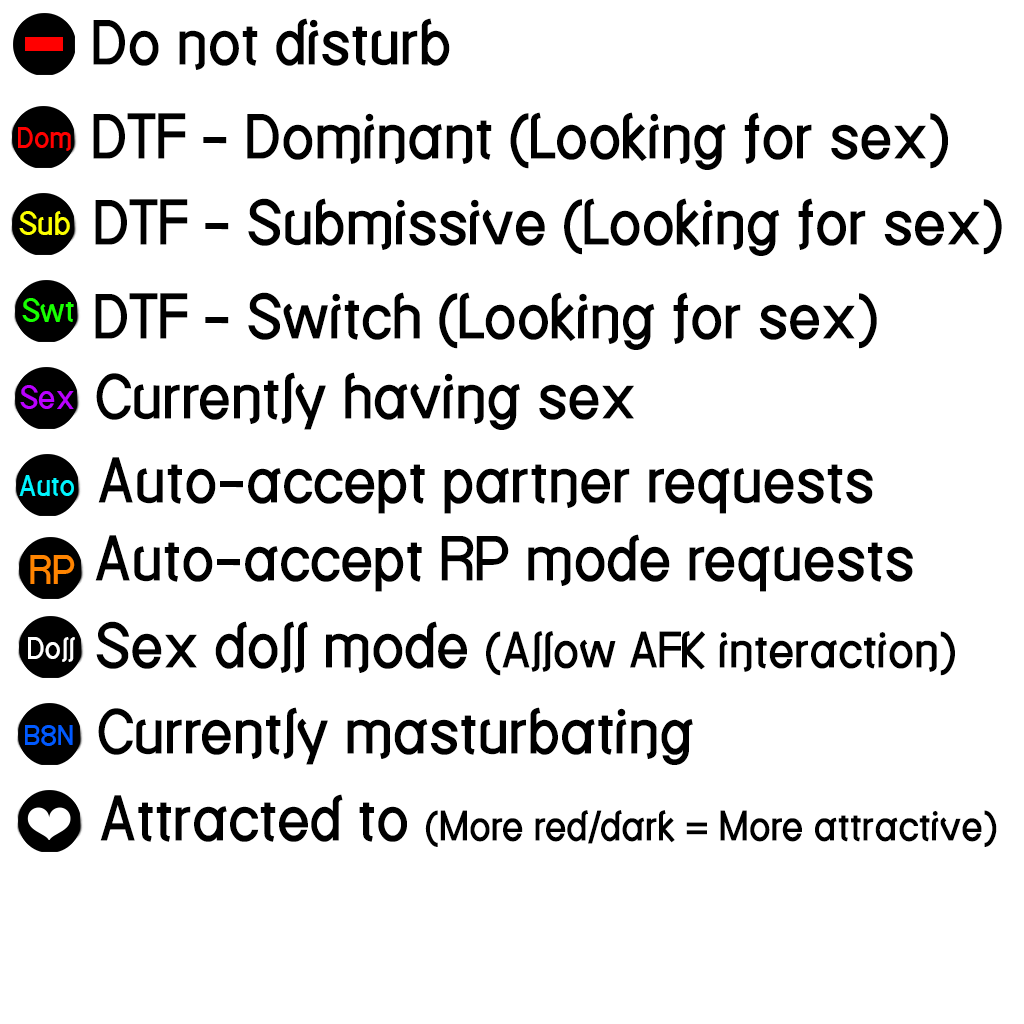
The On-Screen Tracker is a useful feature in ATLust for seeing who around you is currently using ATLust without having to try to cross-reference names in the “Nearby Players” list. When this feature is enabled, the HUD will project markers indicating who is using ATLust and what their current status is. To enable this feature, click the eye button on the top left side of the HUD (White indicates the feature is off, green is on).
¶ Information
Each tracker/marker will have various information displayed. The lines of the marker will change color based on gender identity.
Blue = Male
Pink = Female
Purple = Hermaphrodite
White = Other
¶ Alignment
The trackers/markers may not align properly with the players that they're tracking. To fix this issue, go into the settings menu of your HUD and change the “Tracker Alignment” option. It is best to move your camera so that one of the players is just barely in camera range (On the edge of your screen). Change the setting until the tracker is pointing at the center of the player's avatar.
Note: The trackers are only capable of following the player's physical location. Some animations will move the “visual” avatar far away from their actual physical location. You will notice this when their nametag stays in place but their avatar is moving. Please keep this in mind when aligning your tracker.